
 By
By Summary
– Ultimasaurus Chrome extension offers customization features like removing clutter from search results on various platforms and adding downvotes back to YouTube.
– Install uBlock Origin extension, paste specific codes as filters to remove Google AI Overviews, and apply changes.
– Ultimasaurus and uBlock Origin extensions provide practical solutions for a cleaner web browsing experience without coding knowledge.
– The blog post offers tools and steps for decluttering search results and customizing web browsing experiences efficiently.
1. Use the “Web” tab
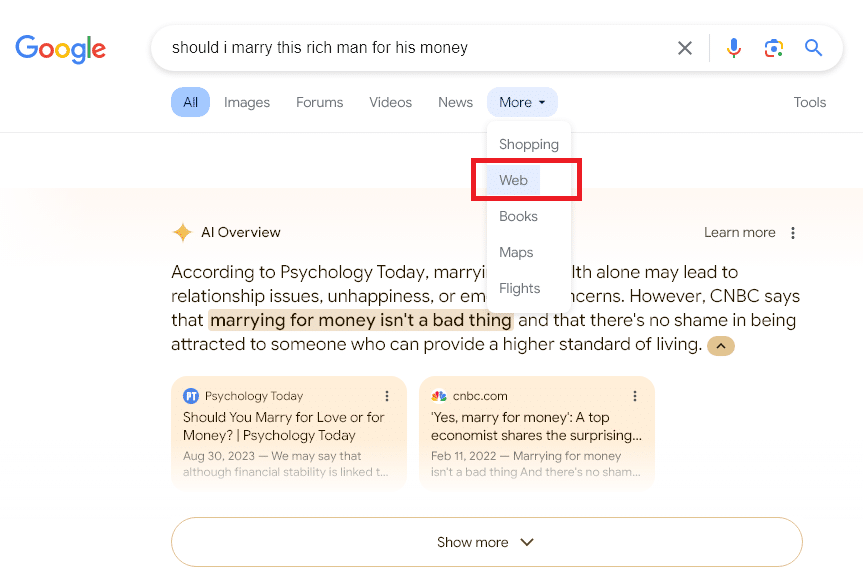
This is a brand new tab from Google that removes not only the AI Overviews but also the Featured Snippet, People Also Ask section, and various other packs and inserts. It only lists classic web search results.
Step 1: Perform a Google Search
Step 2: Click the “More” tab below the search bar.
Step 3: Select “Web” from the dropdown to see web only results.
2. The Ultimasaurus Extension for Chrome
Created by us, Ultimasaurus is a toolbox to help you declutter the desktop web and customize it without learning to code or using other laggy or buggy options.
Step 1: Install the Ultimasaurus Chrome extension via the Chrome Web Store
Step 2: Pin the extension to your toolbar.
Step 3: Click the dinosaur footprint logo.
Step 4: Toggle AI Overviews in Google to “Off”, and click the “Save” or “Save & Refresh Tab” button.
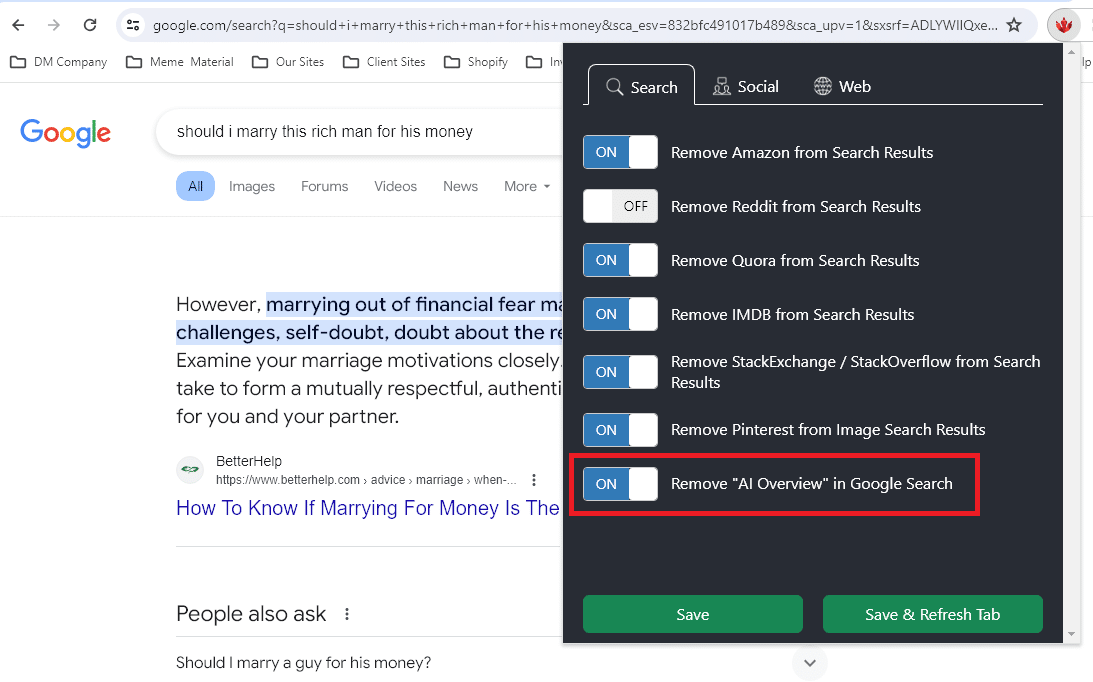
Ultimasaurus comes with a lot of other customization features such as removing Reddit, Quora, Amazon, IMBDB, and StackExchange from search results on Google, Bing, and DuckDuckGo, Removing clutter on X.com (previously Twitter), removing Stories on Facebook, adding downvotes back to YouTube, blocking popup sales / donation messages on YouTube and Wikipedia, and getting automated coupons for Shopify stores.
3. uBlock Origin Extension
Step 1: Click on the UBlock Origin extension’s icon in your toolbar.
Step 2: Click on the 3 gears in the bottom right to open your dashboard.
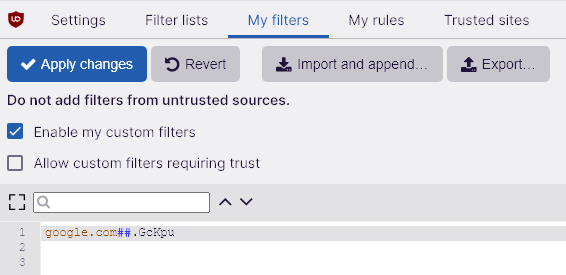
Step 3: Select “My Filters” at the top of your dashboard screen.
Step 4: Paste the following code as a new filter and then click on the “Apply Changes” button
google.com##.GcKpuIf that doesn’t work try this one instead:
google.com##.hdzaWehat tip to Reddit users: u/Neth110 and u/What_The_Tech for this method
Get Updates on SEO and Marketing
[mailmunch-form id=”1145744″]